Network Architecture Strengthening for On-Premises & Remote Users
Networking Infrastructure & Secure Connectivity Design
Network Architecture | Routing | Firewall | NAT | DHCP | DNS | VPN
This project focuses on strengthening network architecture for both on-premises and remote users by improving connectivity, security, scalability, and remote access capabilities. The design incorporates routing, firewall protection, Network Address Translation (NAT), Dynamic Host Configuration Protocol (DHCP), Domain Name System (DNS), LAN switching, and Virtual Private Network (VPN) technologies.
The project demonstrates practical networking concepts, infrastructure design, network security fundamentals, public and private network communication, remote access architecture, and enterprise connectivity planning.
Project Objective
The objective is to build a secure and scalable network architecture capable of supporting office users, cloud services, remote workers, wireless devices, and mobile users while maintaining strong security controls and reliable connectivity.
- Provide stable Internet connectivity for office users.
- Strengthen network security through firewall protection.
- Enable multiple devices to share a public IP address using NAT.
- Automate endpoint network configuration using DHCP.
- Support reliable DNS resolution.
- Improve LAN connectivity and performance using switches.
- Enable secure VPN access for remote users.
Figure 1: Main Physical Network Components
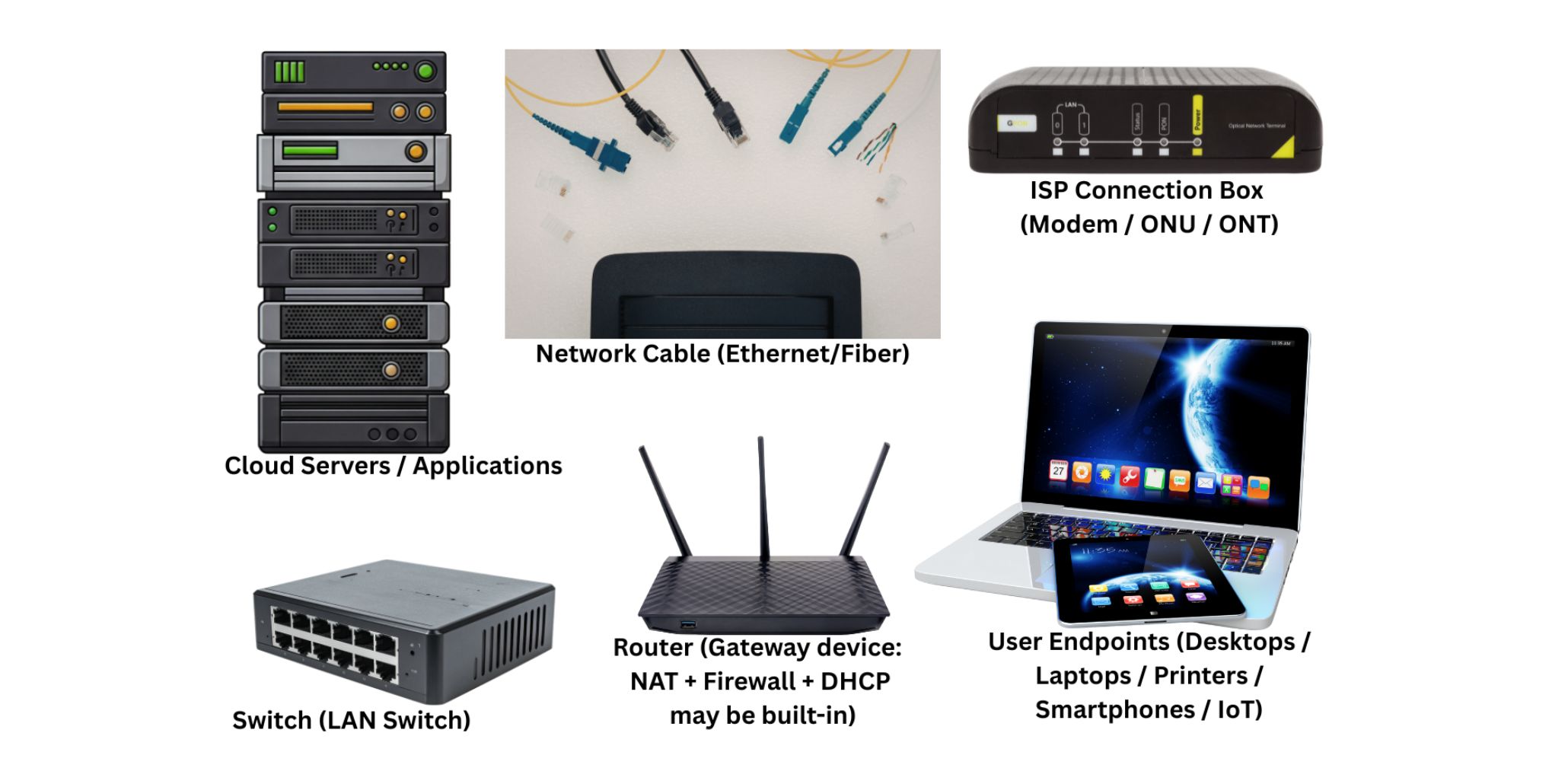
The network architecture consists of cloud servers, Ethernet and fiber connectivity, ISP gateway equipment, routers, switches, and endpoint devices that collectively support communication between public and private networks.
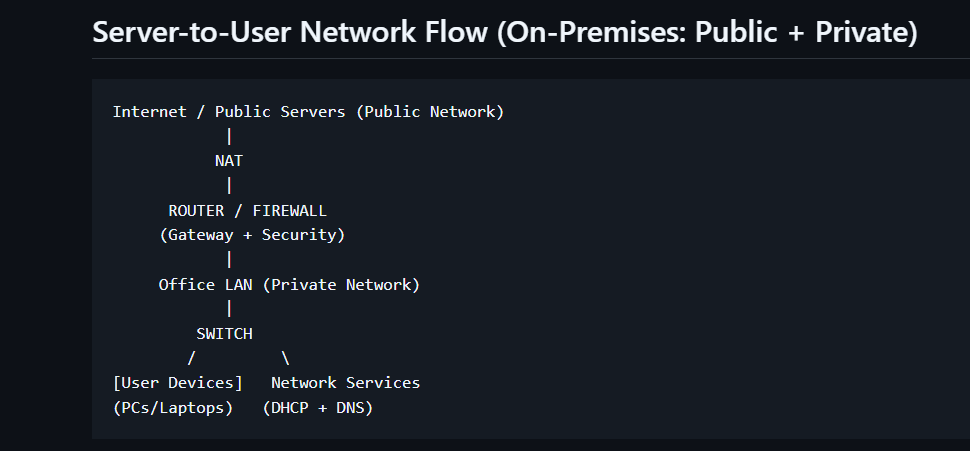
Server-to-User Network Flow (On-Premises)
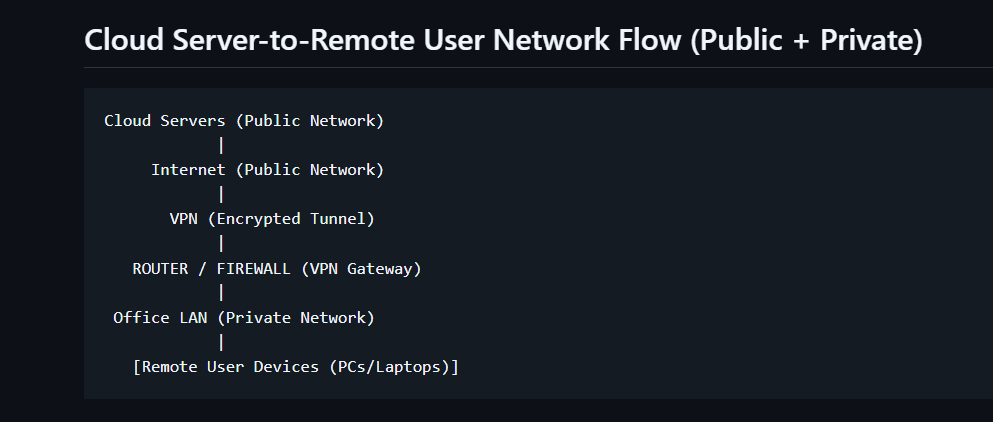
Cloud Server-to-Remote User Network Flow
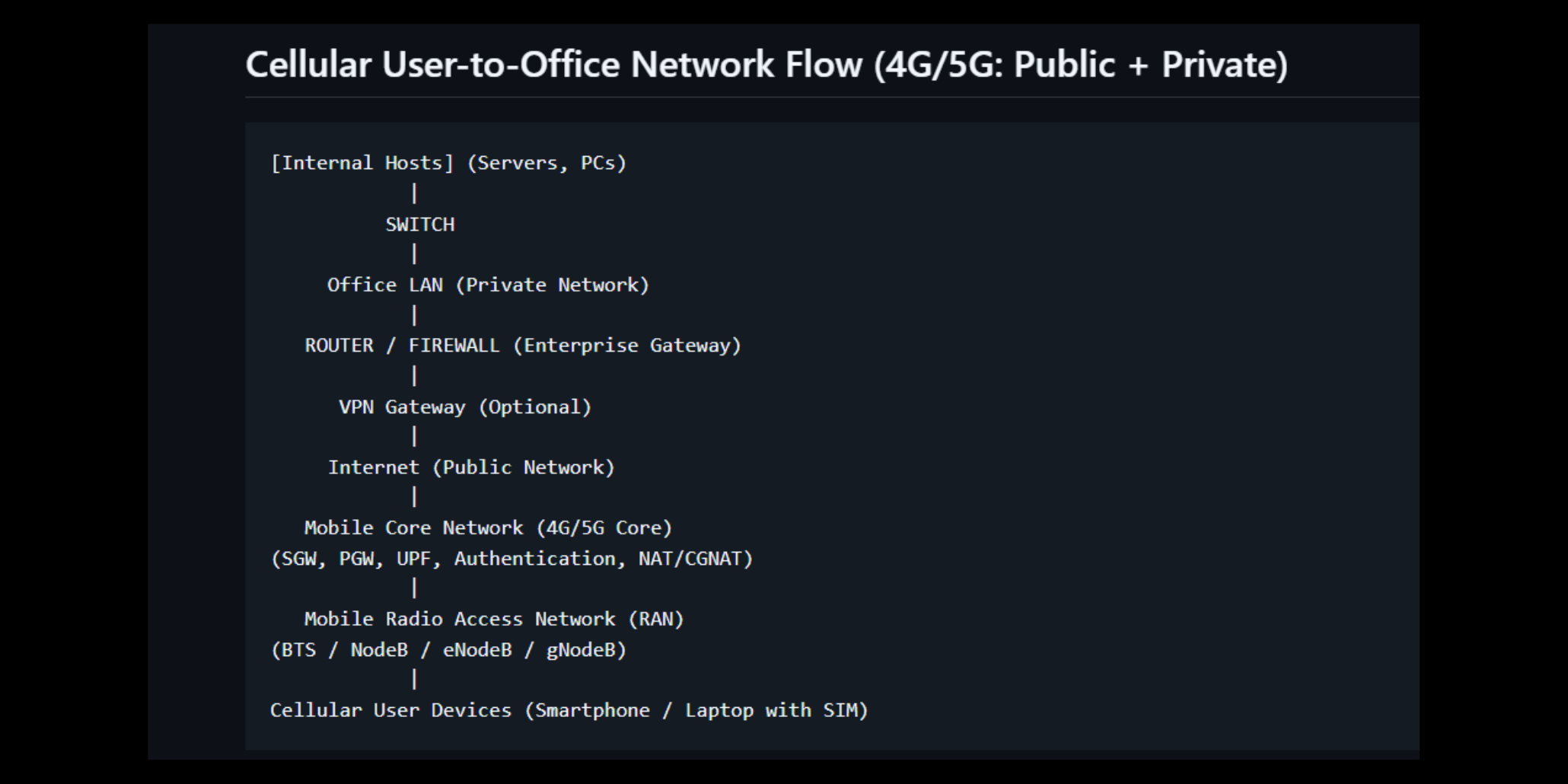
Cellular User-to-Office Network Flow (4G/5G)
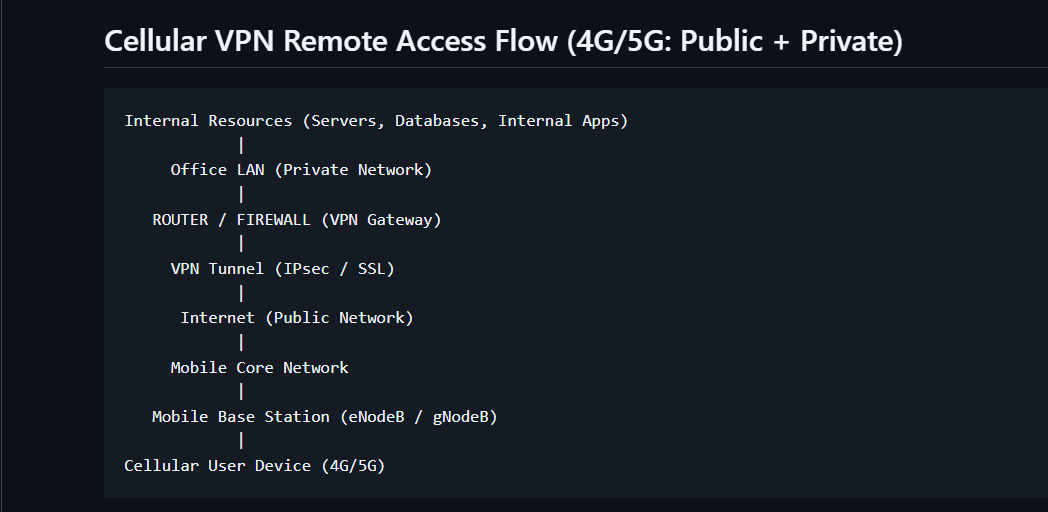
Cellular VPN Remote Access Flow
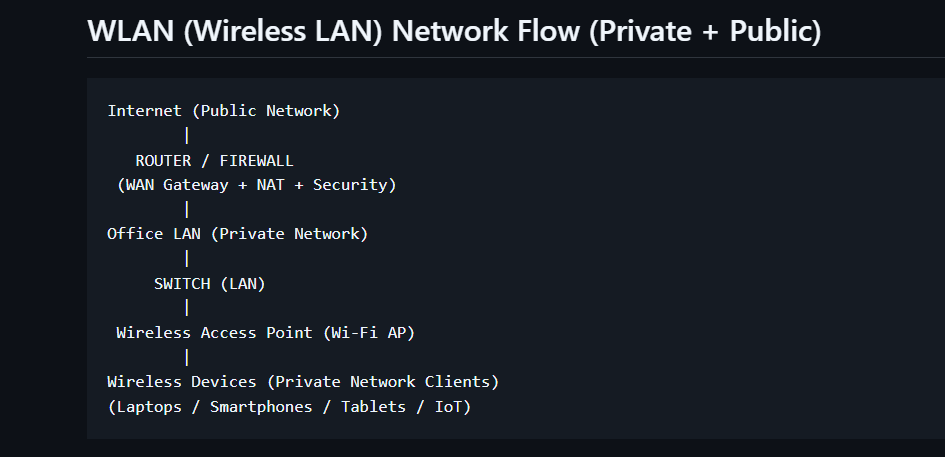
WLAN (Wireless LAN) Network Flow
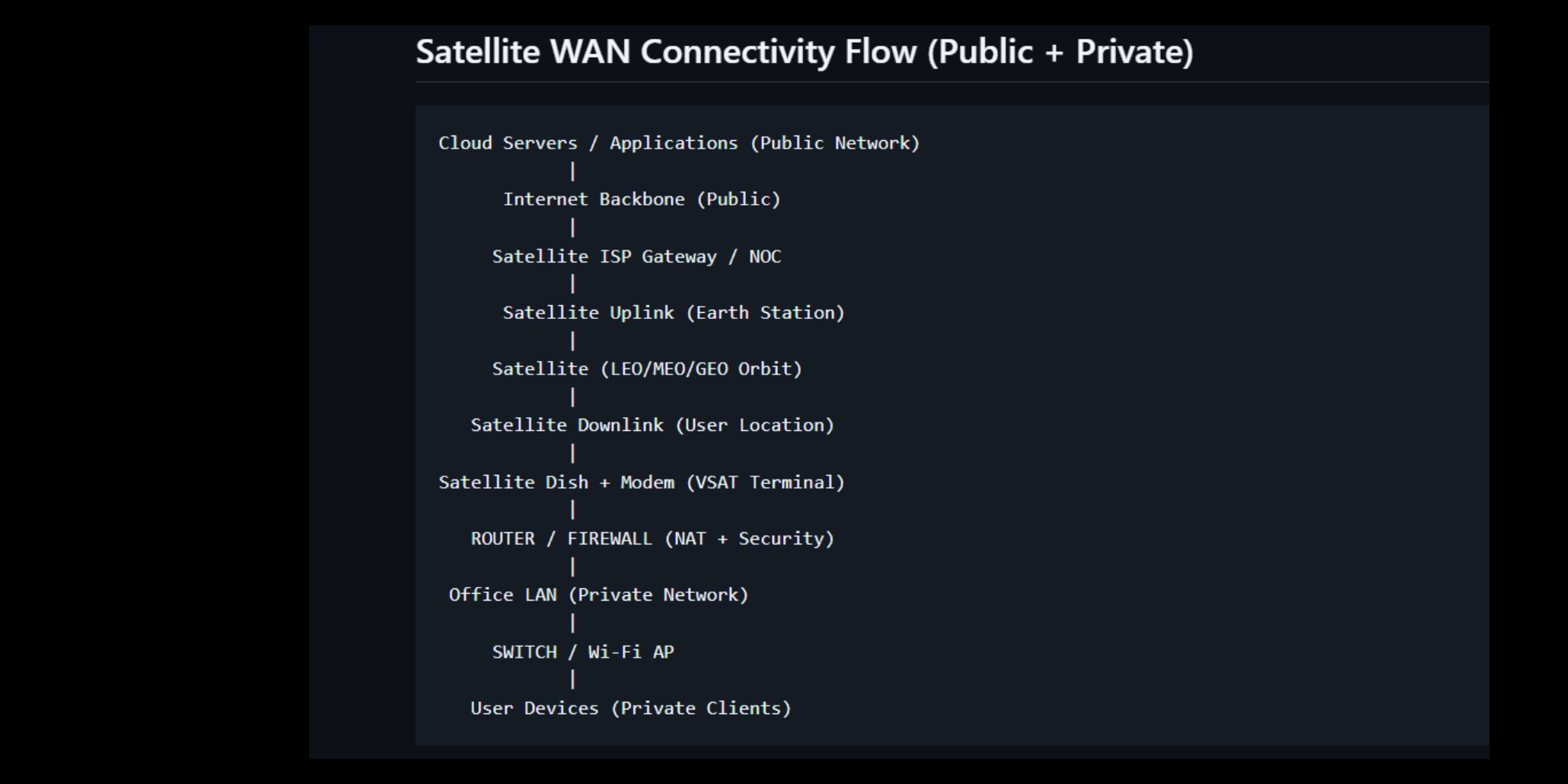
Satellite WAN Connectivity Flow
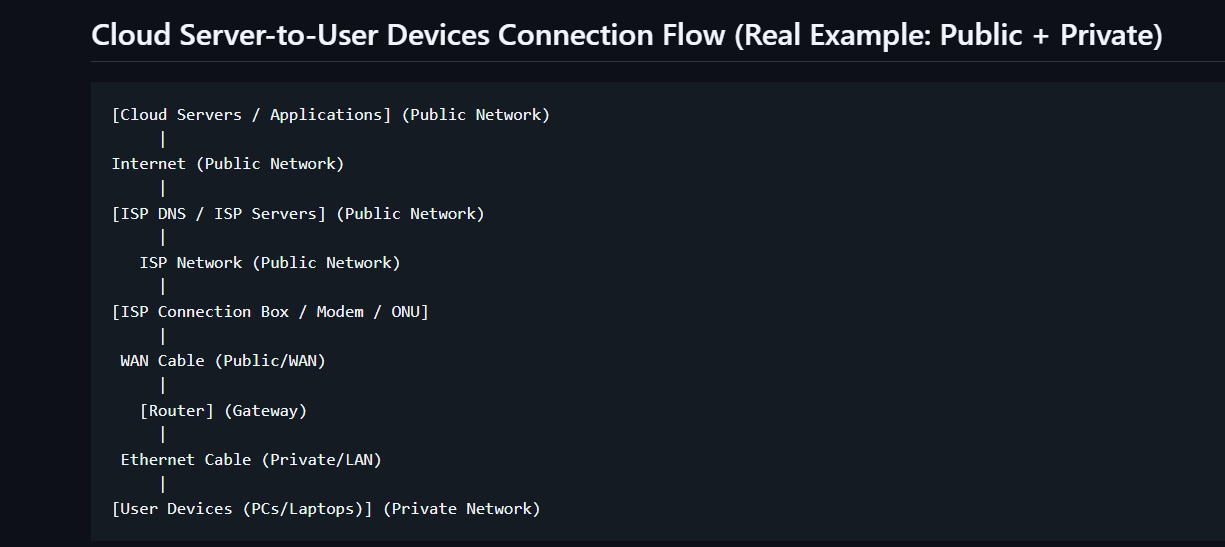
Cloud Server-to-User Devices Connection Flow
Network Services Implemented
1. Router (Gateway Connectivity)
The router serves as the primary gateway connecting the internal LAN to the Internet. It manages traffic routing between public and private networks while supporting NAT, DHCP, DNS forwarding, and basic security functions.
2. Firewall Protection
Firewall controls inspect and filter inbound and outbound traffic to protect network resources from unauthorized access, malware, intrusion attempts, and security threats.
Set Default Incoming Policy
sudo ufw default deny incomingDefault incoming policy changed to 'deny'Set Default Outgoing Policy
sudo ufw default allow outgoingDefault outgoing policy changed to 'allow'Allow SSH Access
sudo ufw allow sshRule added
Rule added (v6)Enable Firewall
sudo ufw enableFirewall is active and enabled on system startup3. Network Address Translation (NAT)
NAT enables multiple internal devices to share a single public IP address while maintaining private addressing within the LAN.
Enable IPv4 Packet Forwarding
sudo sysctl -w net.ipv4.ip_forward=1net.ipv4.ip_forward = 1Enable NAT Masquerading
sudo iptables -t nat -A POSTROUTING -o eth0 -j MASQUERADENAT rule successfully addedAllow LAN-to-WAN Forwarding
sudo iptables -A FORWARD -i eth1 -o eth0 -j ACCEPTForwarding rule successfully addedAllow Established Return Traffic
sudo iptables -A FORWARD -i eth0 -o eth1 -m state --state RELATED,ESTABLISHED -j ACCEPTState tracking rule successfully added4. Dynamic Host Configuration Protocol (DHCP)
DHCP automatically assigns IP addresses, subnet masks, gateways, and DNS settings to client devices, simplifying network administration and reducing configuration errors.
5. Domain Name System (DNS)
DNS services translate domain names into IP addresses, allowing users to access websites and services through human-readable names rather than numerical IP addresses.
6. LAN Switching
Switches provide high-speed communication between internal devices and support scalable network expansion within office environments.
7. Virtual Private Network (VPN)
VPN technology enables authorized remote users to securely access internal resources through encrypted tunnels across public networks.
Update Package List
sudo apt updatePackage lists updated successfullyInstall WireGuard
sudo apt install wireguard -yWireGuard installed successfullyWireGuard Server Interface Configuration
[Interface]
Address = 10.10.10.1/24
ListenPort = 51820
PrivateKey = <SERVER_PRIVATE_KEY>
WireGuard Peer Configuration
[Peer]
PublicKey = <CLIENT_PUBLIC_KEY>
AllowedIPs = 10.10.10.2/32
Key Networking Components Reviewed
- Routers and Gateway Functions
- Firewall Security Controls
- Network Address Translation (NAT)
- DHCP Services
- DNS Infrastructure
- LAN Switching Technologies
- VPN Remote Access
- Wireless LAN Architecture
- Cellular Network Connectivity
- Satellite WAN Connectivity
- Cloud-to-User Network Communications
Key Findings
- Routers serve as the primary gateway between public and private networks.
- Firewalls significantly reduce exposure to unwanted traffic.
- NAT conserves public IP address usage.
- DHCP improves operational efficiency and reduces configuration errors.
- DNS is critical for reliable Internet and application access.
- Switches improve internal network performance and scalability.
- VPN solutions provide secure remote connectivity for distributed users.
- Wireless, cellular, satellite, and cloud connectivity can be integrated into a unified network architecture.
Project Conclusion
This project successfully demonstrates a strengthened network architecture that supports secure communication between cloud services, office networks, wireless users, cellular users, and remote employees. The implementation incorporates routing, firewall protection, NAT, DHCP, DNS, LAN switching, and VPN technologies to improve security, scalability, and operational efficiency.
The project highlights practical networking design principles and provides a foundation for secure modern enterprise networking environments supporting both on-premises and remote access requirements.